
Multi-functional cart plugin
WooCommerce Mini Cart Plugin – Side Cart & Abandoned Cart Recovery
Add an AJAX mini cart to WooCommerce with cart drawer, reward bar & upsells. Auto-detect abandoned carts, send recovery emails & track lost revenue. Free & Pro.
Flexible by design
Show your cart wherever it fits your store
Menu, footer, or a floating sidebar — place it where your customers already look, with zero page reloads.
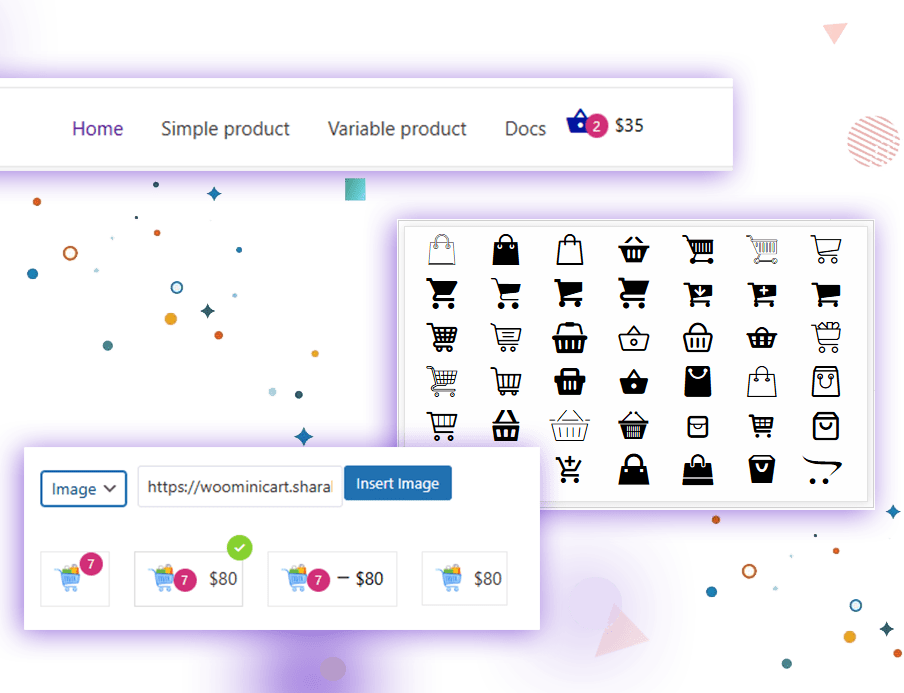
Display cart icon in menu
A live cart icon sits in your WordPress menu, updating item count and total instantly as customers shop — no theme editing required.
A floating cart icon in your footer
Place the cart icon in the footer on any page, or only where you choose. It stays live, always showing the current item count.

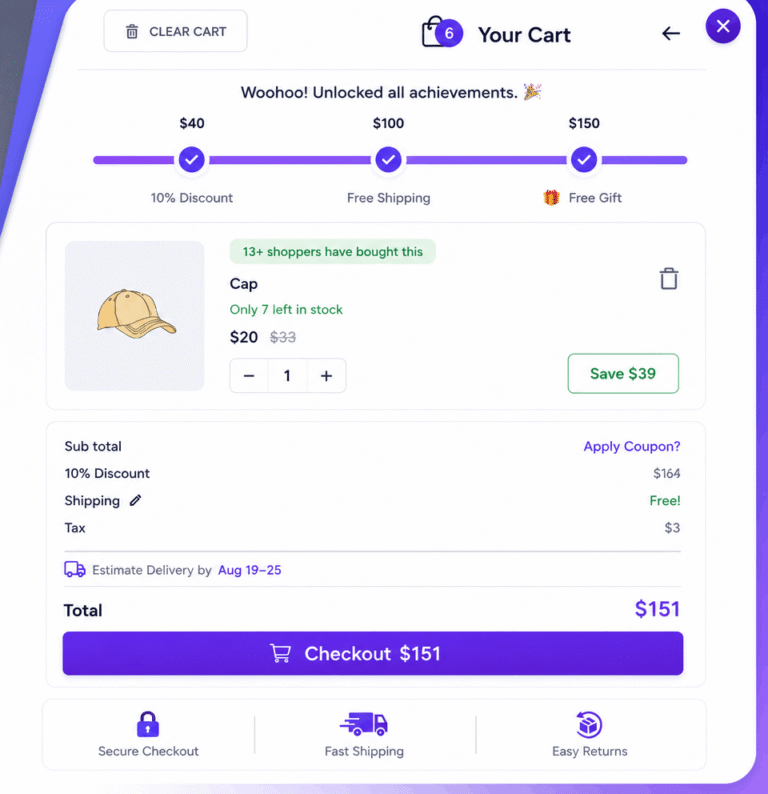
A modern sliding sidebar cart
This floating side cart manages the entire shopping flow smoothly — quantities, coupons, and shipping — without ever leaving the page.
How this helps you sell more
Built to increase every order's value
Small nudges, placed at the right moment, that turn a single-item cart into a full order.
🎯 Multi-Tier Reward Bar
Motivate shoppers to spend more by unlocking free shipping, discounts, and free gifts as their cart grows.

AI-Powered Cross-Sells & Upsells
Smart, cart-aware suggestions shown at the perfect moment to lift your average order value.
Real Purchase Counts
Show how many customers already bought this item — social proof that drives faster decisions.
Dynamic Sale Timer
Draw attention to discounted items with a live countdown badge that pushes buyers to check out.
Looping Fallback Timers
No active sale? A continuous looping countdown still keeps urgency alive on every product.
Everyday conveniences
A cart experience with nothing in the way
Every small friction point in the shopping cart — solved, so customers keep moving toward checkout.
Shipping Calculator
Let shoppers see delivery cost instantly, before they ever reach checkout.
Instant Quantity Updates
Increase or decrease item counts via AJAX — no reload, no waiting.
In-Cart Coupons
Apply discount codes directly in the side cart, and preview upcoming savings.
Undo Removed Items
Accidentally removed something? Restore it instantly with one click.
Stock Limit Alerts
Keep customers informed of availability and prevent checkout surprises.
One-Click Cart Clear
Let shoppers start fresh instantly with a single clear-cart action.
Estimated Delivery Time
Show clear delivery estimates right in the cart to boost order confidence.
Custom Info Box
Display shipping policy, return guarantee, or any announcement in the cart drawer.
Built for speed
Improve checkout speed
Fewer reloads, faster feedback — every interaction feels instant.
AJAX Add To Cart
Customers add products instantly, without ever reloading the product page.
Cart Notifications
A clear notification confirms every item added — no confusion, no double-clicks.
Multi-Currency Compatible
Fully compatible with WooCommerce Payments, Currency Switcher, FOX, and more.
New — Cart Recovery & Analytics
See every abandoned cart. Win it back automatically.
Every cart that’s abandoned is a sale you already had. This built‑in module tracks it, emails the customer for you, and shows you exactly where — and why — you’re losing revenue.
Mini Cart Analytics — Last 30 Days
Automatic Abandoned Cart Detection
Every cart is watched in the background. The moment a shopper goes quiet, it’s flagged as abandoned — no setup, no manual checking.
Real-Time Cart & Session Tracking
Works for guests and logged-in customers alike, capturing device, location, and cart contents the moment they add to cart.
Automatic Recovery Emails
A reminder goes out on its own after a set delay — no need to watch the store around the clock. You choose the timing.
Fully Customizable Email Template
Write your own subject and message in your brand’s voice. Insert cart total, item count, and checkout link with simple placeholders.
One-Click & Bulk "Send Now"
Don’t want to wait for the schedule? Send a recovery email instantly for one cart — or select several and send in bulk.
Smart Recovery Links
The link in every email restores the exact cart at checkout, and tracks the sale back to the email — real recovered revenue, not a guess.
Live Analytics Dashboard
Abandonment rate, average cart value, recovered revenue and more — the health of your checkout, on one screen.
Category & Device Insights
See which product categories lose the most sales, and whether it’s happening on mobile, desktop, or tablet.
Full Cart Management
Search, filter, sort, and act on every abandoned cart from one dedicated page — built for stores with real order volume.
Simple & Transparent
Pricing Plans for Every Business.
Worldwide payments powered by Stripe. Pay easily in USD, EUR, GBP, or your local currency.
Single Site
- 1 Site License
- Standard Support
- 1 Year Updates
- 1 Site License
- Priority Support
- Lifetime Updates
Professional
- 5 Sites License
- Standard Support
- 1 Year Updates
- 5 Sites License
- Priority Support
- Lifetime Updates

Our 100% Money-Back Guarantee
Take a full 14 days to put WooCommerce Barcode Pro to work on your store. If it isn’t the right fit, just reach out — we’ll refund every cent, no questions asked.

Sharabindu Bakshi
Founder, Sharabindu

Got Questions?
Frequently Asked Questions (FAQ)
Here you can find some frequently asked questions about this cart plugin.
How can I benefit from the WooCommerce Mini Cart plugin?
This plugin helps customers easily view their cart items, update quantities, remove products, apply coupon codes, and calculate shipping without leaving the page. The built-in rewards bar boosts sales and motivates customers by showing free-shipping or discount goals.
Do I need WooCommerce for this mini cart plugin to work?
Yes. The plugin requires WooCommerce to be installed and activated on your WordPress site.
Does the mini cart plugin support WooCommerce Multi-Currency or Currency Switcher plugins?
Yes. The premium version supports WooCommerce Multi-Currency and other currency switcher plugins to ensure correct price updates inside the mini cart.
Will the mini cart work with all WordPress themes?
Yes, the plugin works with all well-coded themes. If your theme uses custom cart templates, you may need to adjust settings or contact support.
Does the plugin support page builders like Elementor, Divi, or Gutenberg?
Yes, the plugin works smoothly with popular builders, and the cart icon/shortcode can be placed anywhere.
Does the mini cart update automatically via AJAX?
Yes, all cart updates—quantity changes, item removal, coupon application, and shipping calculations—are fully AJAX-based, without page reload.
Can I customize the appearance of the mini cart?
Yes. You can change colors, icon styles, button styles, and layout options. The Pro version allows deeper customization.
Will this plugin slow down my website?
No. The plugin is optimized for speed and uses lightweight scripts. It does not impact your site’s performance.
Can I disable the mini cart on specific pages?
Yes. The Pro version lets you control where the cart icon appears (product pages, checkout, custom pages, etc.).
Do I need any coding skills to use the Mini Cart plugin?
No coding skills are needed. Just install, activate, and configure the plugin. You can also follow our detailed documentation for guidance.
Can I use the Mini Cart plugin on client websites?
Yes. You can use the plugin on client sites by choosing the Professional or Agency license plans, which allow premium usage on multiple domains.
Is there a trial version of the Mini Cart plugin?
We don’t offer a trial for the premium version, but you can use the free version with limited features to test functionality before upgrading.

Installing this mini cart plugin was one of the best upgrades we’ve made to our WooCommerce store. The AJAX side-cart flyout opens seamlessly whenever a customer adds an item, allowing them to adjust quantities, view shipping, and apply coupons without reloading the page. The free shipping progress bar inside the mini cart has also noticeably boosted our average order value. Exceptional code quality and smooth UX!
I love how easy it is to add the floating cart icon to our header menu and footer. The custom icon options match our site branding perfectly, and the subtle animated notification gives customers clear feedback when an item is added. Most importantly, it’s very lightweight and hasn’t slowed down our site load speed at all. Highly recommended for any online store!
The Mini Cart for WooCommerce plugin works perfectly. The AJAX cart, coupon support, and shipping calculator make checkout faster and easier.
It’s lightweight, fast, and highly customizable. One of the best WooCommerce cart plugins available.