
⚡ Instant Barcode Generation
WooCommerce Barcode Generator Plugin
Our WooCommerce Barcode Generator auto-creates, prints & scans EAN, UPC & Code128 barcodes for products, orders & invoices. Bulk label printing included. Try the live demo
Live since 2021
Version 8.0.14.6
Updated Sep 30, 2026
One-Click Barcode Generation
Build labels around the barcode itself — price, weight, category, even two custom fields — then print them in layouts sized for your shop or warehouse.
Barcodes with just one click.
Activating the plugin assigns a unique 12‑digit EAN‑13 to every product immediately. Change the number, format or digit count once, and every product updates instantly.
EAN & UPC Code Generator
Generate EAN‑13, EAN‑8 and UPC codes and assign them straight into the barcode number, SKU or GTIN field — no re‑entry needed.
Display barcodes on product pages.
Show each product’s barcode right on its product page, with a distinct code per variant, so customers and staff see the same source of truth
Edit, print, download — in one place
Generate and customize a sticker straight from the product edit screen, print or download it, and print an entire variable product’s set at once.
Barcodes built from the data you already have
A barcode is only as useful as the number inside it. Choose where that number comes from, and every product and variation follows. Nothing is stored as an image file; barcodes are generated on the page.
Auto-generated number
The plugin creates a unique number for every product and variation. Choose the format and digit count once.
SKU
Use your existing SKU as the barcode value, so labels match your inventory sheet.
GTIN / UPC / EAN / ISBN
Read WooCommerce’s built-in global identifier field, so your real retail numbers are printed as they are.
Your own custom field
Type the meta key where your barcodes already live, for example one created by an import tool, and the plugin reads it.
Barcodes that create themselves
The moment a product, order or invoice is created, its barcode is too. Nobody on your team has to remember to generate one.
Product barcodes, on every variation
Each product and product variation gets its own scannable EAN‑13, EAN‑8, UPC or Code128 barcode the moment it’s saved — including on the live product page, so staff and customers can both verify it.
Auto-Generate Order Barcodes
Automatically attach barcodes to WooCommerce orders for fast tracking and effortless fulfillment. You can also create custom order barcodes directly from the WooCommerce Order Dashboard.
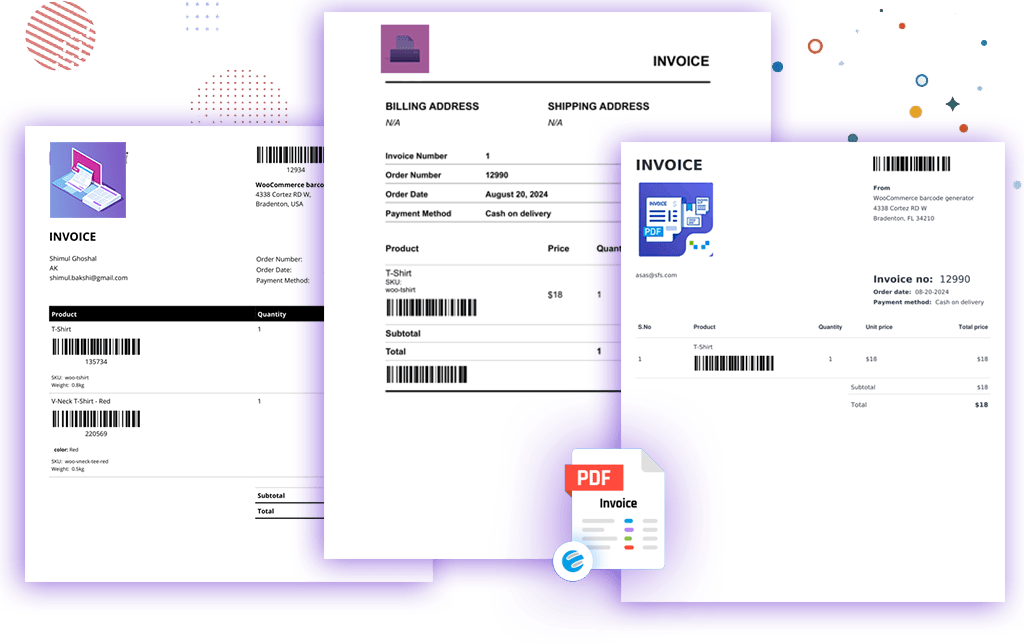
Barcodes printed on invoices
Attach secure barcodes directly to PDF invoices and packing slips, so anyone handling a shipment can verify the order with a single scan instead of matching numbers by eye.
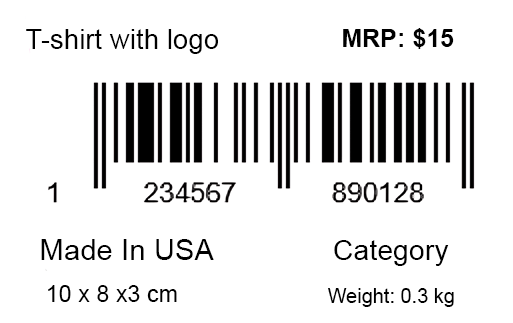
Stickers that carry more than a code
Build labels around the barcode itself — price, weight, category, even two custom fields — then print them in layouts sized for your shop or warehouse.
- 01Price & product nameShown directly on the label, no separate price tag needed.
- 02Weight & dimensionsKeep sizing details on hand for packing and shipping.
- 03Custom text or shortcodesTwo free-text fields for anything your store needs to show.
- 04CODE128, EAN‑13, EAN‑8, UPCAll the standard formats retail scanners expect.
- 05Category, tag & brandSort and identify stock at a glance on the shelf.
Print one label, or ten thousand
Build labels around the barcode itself — price, weight, category, even two custom fields — then print them in layouts sized for your shop or warehouse.
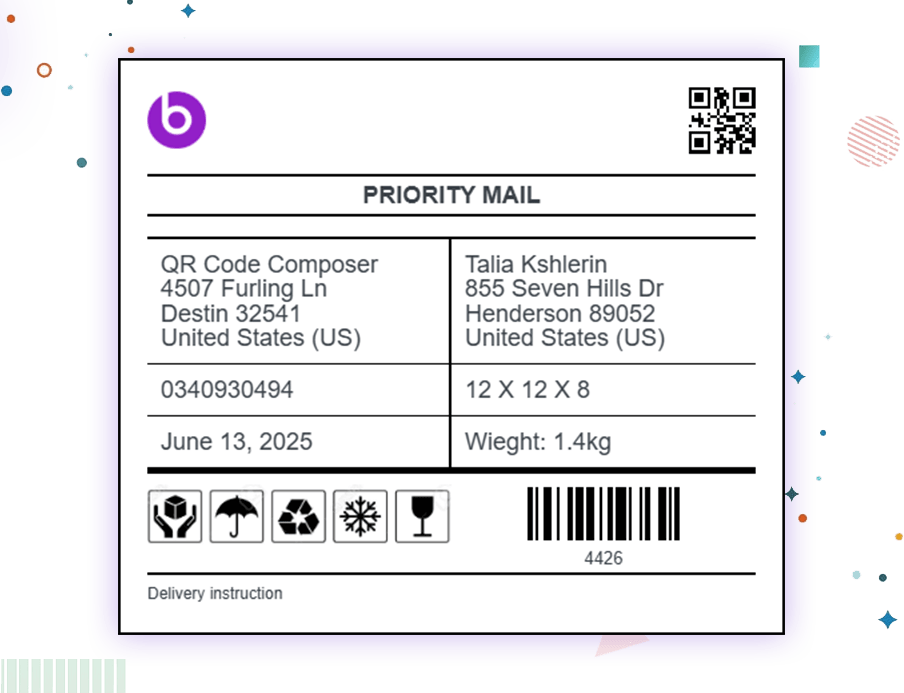
Shipping stickers
Generate accurate, barcode-ready shipping labels per order — fewer handling errors, faster dispatch.
Scan instead of searching
Point a scanner at a barcode and skip typing order numbers or hunting through inventory lists by hand.
Order search
Scan an order barcode to pull up status, details and receipt instantly, without typing an order number.
Instant product lookup
Scan any product barcode to identify and manage the exact item in your WooCommerce inventory.
Keep the barcodes you already use
Importing from Shopify or another platform? Your barcodes don’t have to be recreated. Import them with your migration tool, then point the plugin at the field where they landed: GTIN, SKU or a custom meta key. Stickers, product pages and scan search use the same numbers your business already knows.
1. Import
Use any migration or CSV import tool.
2. Choose the source
Select GTIN, SKU or your custom meta key in the plugin settings.
3. Print and scan
Existing barcodes are used as they are. Empty fields can be filled with one click.
Premium Quality for Professionals
We deliver high-performance barcode solutions designed to save your business hours of operational time.
Single Site
- 1 Site License
- Standard Technical Support
- 1 Year Updates
- One-Time Purchase
- No Auto-Renewal
- 1 Site License Activation
- Pay Once, Use Forever
- Zero Annual Renewal Fees
- Priority Support Included
- Lifetime Updates
- 🔥 Saves $230+ over 5 year
Professional
- 5 Sites License
- Standard Technical Support
- 1 Year Regular Updates & Fixes
- One-Time Purchase
- No Auto-Renewal
- 5 Site License Activation
- Pay Once, Use Forever
- Zero Annual Renewal Fees
- Priority Support Included
- Lifetime Updates & Fixes
- 🔥 Saves $590+ over 5 year
Agency
- 25 Sites License
- Standard Technical Support
- 1 Year Regular Updates and Fixes
- One-Time Purchase
- No Auto-Renewal
- 25 Site License Activation
- Pay Once, Use Forever
- Zero Annual Renewal Fees
- Priority Support Included
- Lifetime Updates & Fixes
- 🔥 Saves $990+ over 5 year

Our 100% Money-Back Guarantee
🔒 14-Day Money-Back Guarantee
Try WooCommerce Barcode Generator risk-free. If it doesn’t solve your inventory and barcode needs, request a 100% refund within 14 days. No risk, no hassles.

Sharabindu Bakshi
Founder, Sharabindu
Frequently Asked Questions (FAQ)
Here you can find some frequently asked questions about this barcode plugin for WooCommerce.
What is the WooCommerce Barcode Generator plugin?
The WooCommerce Barcode Generator plugin is a WordPress plugin that allows store owners to generate, display, and print barcodes for WooCommerce products and orders. It helps with inventory management, order processing, and barcode-based workflows directly inside the WooCommerce dashboard.
How can I generate product barcodes for WooCommerce?
You can generate product barcodes automatically by installing the WooCommerce Barcode plugin. Once enabled, barcodes are created for each product and can be displayed on product pages, admin screens, and printable barcode labels.
Can I print barcode labels for WooCommerce products?
Yes, the plugin supports barcode label and sticker printing. You can bulk print barcode labels for WooCommerce products, orders, and packages using customizable layouts suitable for warehouses and shipping.
What types of barcode formats are available?
The plugin supports common barcode formats including EAN-13, UPC-A, Code 128, and other popular barcode standards used in retail and inventory systems.
Can I add custom fields or labels to barcodes?
Yes, you can customize barcode labels by adding product names, SKUs, prices, or custom text fields, making barcode stickers more informative and easy to scan.
How does the plugin help with inventory and order management?
By assigning unique barcodes to WooCommerce products and orders, the plugin enables faster product lookup, easier stock tracking, and improved order fulfillment using barcode scanning.
Is the plugin compatible with WooCommerce updates?
Yes, the WooCommerce Barcode Generator plugin is regularly updated to stay compatible with the latest WooCommerce and WordPress versions.
Can I scan barcodes at WooCommerce checkout?
The plugin allows barcode scanning for product lookup and order handling, making it compatible with barcode-based checkout and POS workflows.
Is WooCommerce Barcode Generator compatible with POS systems?
Yes, the plugin can be used alongside most POS systems that support standard barcode formats such as EAN or UPC.
Can the plugin be connected to a mobile scanning app?
Yes. You can use third-party barcode scanning apps:
Android: Gamma Barcode Scanner
