

How to Generate QR Code in WooCommerce (Complete Guide)
 Michael Hayes
- 3 min read
QR codes have become essential for modern e-commerce. From product packaging to order tracking and customer verification, QR codes make your WooCommerce store faster, more organized, and more user-friendly.
If you want to add QR codes to your WordPress or WooCommerce website, then the WordPress QR Code Plugin is the best solution. It will automatically generate QR codes for products, orders, pages, posts, email invoices, and customer profiles without any coding.
In this tutorial, you will learn how to use this plugin to create QR codes in WooCommerce step by step.
Why use QR codes on your WooCommerce website?
QR codes will help you:
- Quickly access products or orders,
- Share product information offline,
- Quickly complete shipping tasks,
- Quickly verify orders
By adding QR codes, you can enhance your customers’ shopping experience.
Step 1: Install and activate our QR Code Composer (QR Code Generator) plugin
First, install the plugin on your WooCommerce site.
How to install:
-
Go to WordPress Dashboard → Plugins → Add New
-
Upload: QR Code Composer PRO
-
Install → Click to activate
-
A new menu QR Composer Pro will appear in the WordPress admin menu bar.
-
Demo Admin: Adin Demo
-
Once installed, you are ready to add QR codes to your WooCommerce website.
Step 2: Auto-Generate QR Codes for WooCommerce
The plugin will automatically generate QR codes on the WooCommerce website
Where it appears:
-
Product page
-
Product edit screen
-
PDF invoice (optional)
-
WooCommerce Order Page
- WooCommerce Order Email
- My account Page (Customer)
You can display product QR codes in four different positions on the product page.
This is perfect for physical stores, catalog printing, packaging labels, and offline marketing.

Step 3: Generate QR Code for WooCommerce Orders
Every order automatically receives a unique QR code.
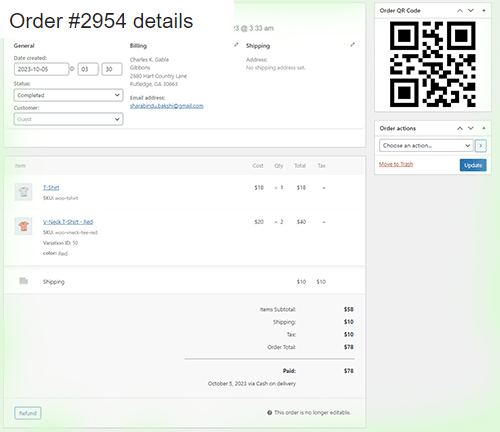
Benefits of Order-QR Code for WooCommerce:
- Warehouse Management
- To track orders,
- To view order codes:
- WooCommerce → Orders → View Order Codes
You can view the QR code inside:
WooCommerce → Orders → View Order
Customers will see the order QR on the My Account page → Orders page.
Step 4: Add QR Code to WooCommerce Order Emails
The plugin can automatically insert a QR code into every order confirmation email.
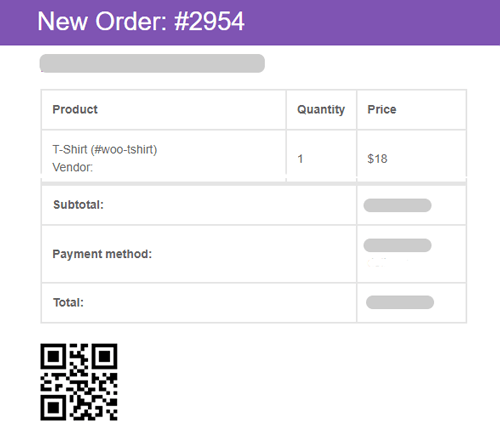
This allows:
-
Customers to open their orders instantly
-
Delivery staff to verify orders by scanning
-
Store owners need to speed up customer support
Just scan — and the order appears immediately.
Step 5: Add QR Codes to PDF Invoices
If your store uses PDF invoice plugins, the QR Code Generator plugin can include QR codes inside:

-
Order invoice
-
Packing slip
-
Shipping label
This is ideal for:
-
Offline delivery
-
Warehouse packaging
-
Store pickup
-
Customer documentation
Every printed copy becomes a scannable smart document.
Step 6: Generate vCard QR for Customers

The plugin auto-generates vCard QR codes for customers.
What it includes:
-
Customer name
-
Email
-
Phone
-
Website
Customers can download their vCard QR directly from the My Account page.
Conclution
Generating QR codes in WooCommerce is incredibly easy with the WordPress QR Code Generator Plugin.
It offers complete automation for:
-
Products
-
Orders
-
Emails
-
Invoices
-
Pages
-
Posts
-
Customer vCard
-
And even frontend QR features
Writted by
Michael Hayes
Michael Hayes is a dedicated specialist in Digital Marketing & Support, helping businesses grow their online presence with strategic solutions and reliable technical assistance. He combines strong communication skills with hands-on expertise to deliver results that exceed client expectations.
You may also Like
How to Generate QR Codes in WordPress
Generating QR codes has become a common requirement for WordPress websites, especially for businesses, bloggers, and WooCommerce store owners. QR
How to Add QR Code to WordPress Website (100% Free – Step by Step Guide)
QR codes have become a powerful tool for sharing content, improving user engagement, and connecting offline users to online pages
How to Generate QR Codes Using a WordPress Plugin
QR codes have become one of the most powerful tools for modern websites—perfect for sharing links, product details, digital downloads,
How Stylish QR Code Increases Brand Value of a Website
A stylish QR code generator allows you to transform plain black-and-white QR codes into visually appealing designs that align